
How to Capture Emails with Video: The Complete Guide to Video Gating
Video gating is the strategy of requiring a viewer to enter their email address before they can watch a video or before they can continue watching it. Unlike paywalls (which charge money) or password-protected content (which restricts to known users), video gating trades access to valuable video content for a single piece of information: an email address.
It's the highest-converting lead capture method most email marketing professionals use.
If you've ever wished your YouTube videos could grow your email list directly, and not just through description links that 2% of viewers click, video gating is how you do it.
This guide covers everything: how video gating works, the data behind why it converts so well, the three types of gates you can use, which tools exist, and step-by-step instructions for gating your first YouTube video behind an email opt-in form.
Video gating vs. content gating
Content gating has been an email marketing staple for over a decade. The typical version looks like this: you write a whitepaper, ebook or other lead magnet, put it behind a form, and collect email addresses from people who want to read it.
Video gating applies the same principle to video content, but it works fundamentally differently. And, as the data shows, significantly better!
The reason is engagement. A gated video delivers value right away. When someone sees a compelling video thumbnail with a short form asking for their email, the mental calculation is simple: enter one field, watch something interesting right now.
Or, with our service you can even set the video to partially play, and then require an email to finish watching.
That's why gated video consistently outperforms gated PDFs, ebooks, and whitepapers in conversion rate — often by a factor of 2-3x.
The data behind video gating — and why the numbers are hard to ignore
The most comprehensive data on video email capture comes from Wistia, which has tracked millions of in-video form submissions through their Turnstile feature.
They find 24% of viewers who encounter a lead gen form as a video email gate will fill it out. [https://wistia.com/learn/marketing/video-marketing-statistics]
To put that in context, the average annotation link converts at a 3% rate [wistia link above], the average landing page converts at 2.3%[https://www.campaignmonitor.com/resources/knowledge-base/what-is-a-landing-page-conversion-rate/], and the average general website email popup converts at around 3% [https://bdow.com/stories/pop-up-statistics/].
Video gating operates in a completely different tier.
The numbers get even more interesting when you look at specific video types and gate placements. For longer videos (60+ minutes), post-roll email gates placed at the very end convert around 65% of the people who reach that point. These viewers have already invested significant time, making them highly qualified leads who are genuinely interested in the content.
Other data points reinforce why video is uniquely suited for email capture. Video on a landing page increases conversions by up to 80%. Viewers retain 95% of a message when watching video compared to 10% when reading text. And 72% of customers say they'd rather learn about a product through video than any other medium.
The gap between these numbers and what most creators currently achieve with YouTube-native tools (description links, cards, end screens) represents a massive untapped opportunity.
The three types of video gates and when to use each
Not all video gates work the same way. Where you place the gate in the viewing experience dramatically affects both conversion rate and viewer experience. Here are the three approaches:
1. Pre-roll gate (before the video starts)
The viewer sees a form overlay before any content plays. They must enter their email to watch anything.
Best for: Exclusive content, webinar replays, course previews, premium tutorials. Works well when the viewer already knows what they're about to watch (they clicked a specific link to get here) and the content is clearly valuable enough to justify the exchange.
Conversion rate: Wistia found 32% conversion rates for short videos (under 1 minute), but very low conversion rates (~4%) for long videos.
Watch out for: High bounce rates if the video topic isn't compelling enough or if the viewer doesn't understand what they'll get. Always include a clear description of the video content alongside the form.
2. Mid-roll gate (partway through the video)
The video plays freely for a portion, typically 25-50% of total length, then pauses and presents the email form. The viewer must opt in to continue watching.
Best for: For videos between 1 minute and 5 minutes long. This is the gold standard for video gating because it leverages the "engagement hook." The viewer has already started watching, they're interested, and now they need to make a small commitment to see the rest.
Conversion rate: Typically 10-25%. The highest-converting gate type for most content because it combines demonstrated value (they've seen enough to want more) with an open loop (the content isn't finished).
Watch out for: Placing the gate too early (before the viewer is hooked) or too late (after they've already gotten the main value).
3. Post-roll gate (after the video ends)
The video plays in full, and the email form appears after the content concludes.
Best for: Long form videos, 30 minutes or more. Building trust with new audiences, content where the viewing experience itself creates desire for more (serialized content, teasers, courses with multiple modules).
Conversion rate: 15-25%. Among all viewers, conversion is lower (10-15%) because many leave before reaching the end. But among viewers who watch to completion, conversion rates can exceed 50-65%. These are your most engaged prospects!
Watch out for: The "natural exit" problem. Many viewers close the tab when a video ends. If your post-roll gate loads a fraction of a second too late, you lose the opportunity. Use a form that appears while the final seconds are still playing, not after a blank screen.
How to gate a YouTube video behind an email form
Here's the practical part. Most creators assume that collecting emails from video requires moving your video hosting to an expensive platform like Wistia ($79/month for email capture) or Vidyard. But there's a simpler approach: keep your videos on YouTube instead of those video hosting platforms, and add an email gate overlay when they're embedded on your own website.
This is the approach tools like EmailPlay were built for. Here's the general workflow:
Step 1: Choose a video to gate
Start with content that delivers clear, specific value. Tutorials, a case study walkthrough, an exclusive behind-the-scenes look, or a course preview lesson. The video should be something your audience would genuinely want to watch. Gating generic content that's freely available elsewhere won't work, but gating content that solves a specific problem will.
A good candidate for your first gated video include a YouTube video that already performs well. Pop your top performing YouTube video into an SEO optimized blog post on the same topic and see website engagement rates soar and emails roll in.
Step 2: Set up the email gate
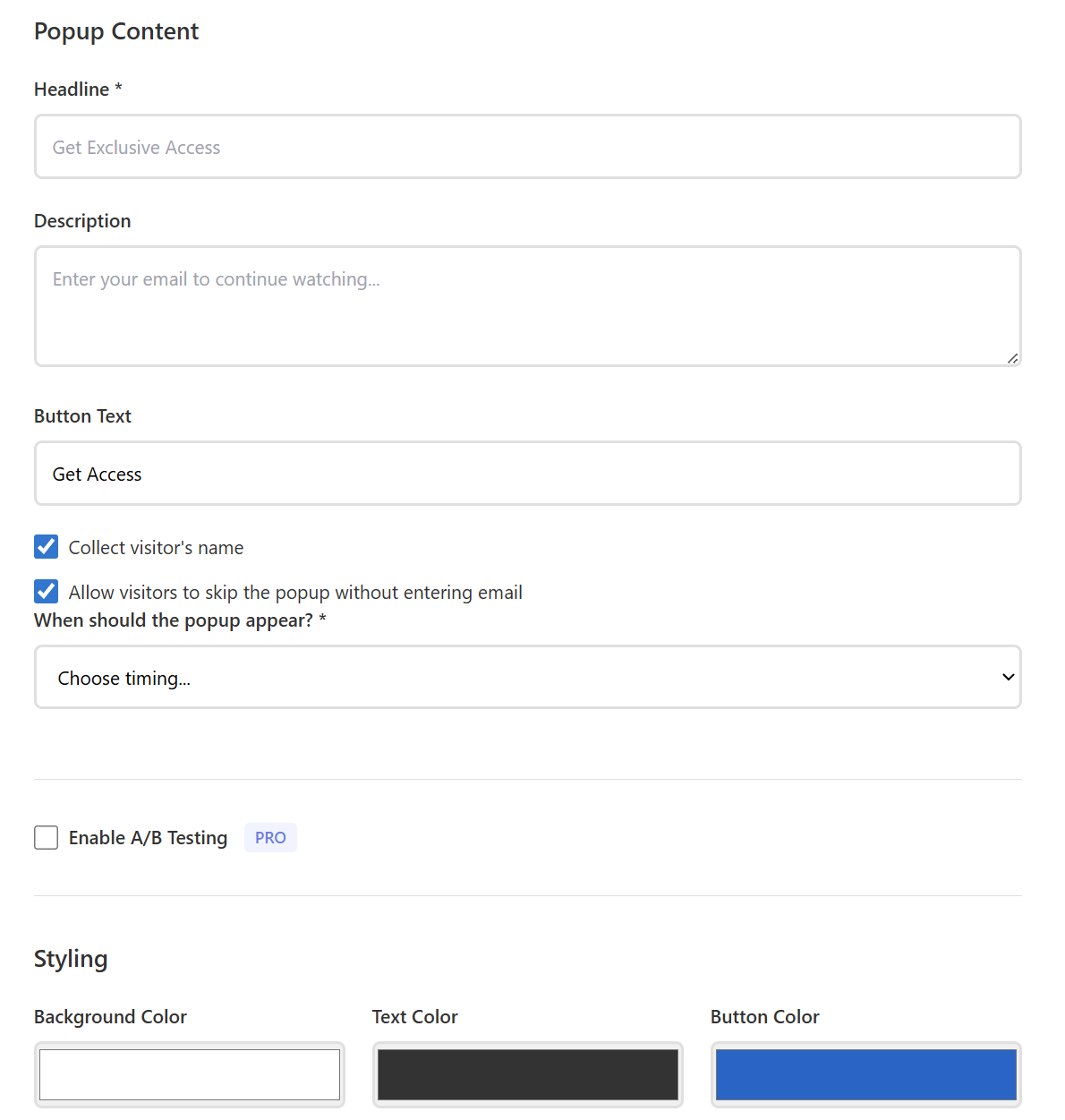
Using a YouTube-native gating tool like emailplay.io, you paste your YouTube video URL, then configure the gate: what text appears on the form, which fields to collect (email only is recommended for maximum conversion), button text, where in the video the gate appears (pre-roll, mid-roll, or post-roll), and whether the viewer can skip the gate or not.
Step 3: Connect your email provider
Link the gate to your email marketing platform such as Mailchimp, ConvertKit (Kit), or another provider. This ensures that every email captured flows directly into your list, tagged appropriately so you know which video generated that subscriber.
Set up an automation within your email client: when someone opts in through the video gate, they should immediately receive a welcome email or enter a nurture sequence. The connection between "watched your video" and "received your first email" should feel seamless.
This will get you higher click-through rates on your emails, and more effective marketing emails in general.
Step 4: Embed on your website
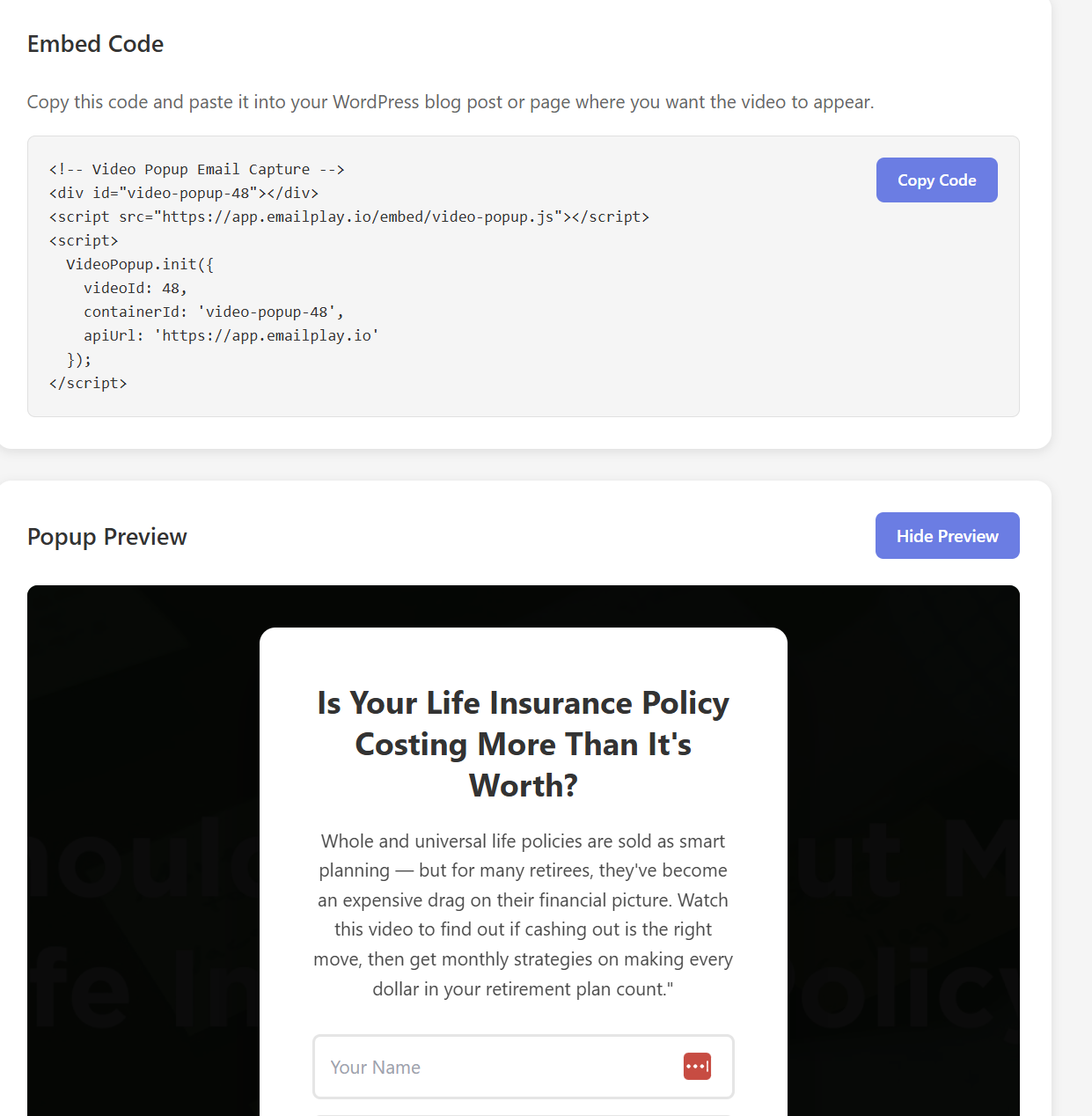
Copy the embed code provided by your gating tool and paste it into your website — whether that's WordPress, Squarespace, Wix, Kajabi, or raw HTML. The embed replaces or wraps the standard YouTube embed, adding the gate functionality while keeping the video hosted on YouTube.
Step 5: Test and optimize
Watch the video as a visitor would. Verify that the gate appears at the right moment, the form submits correctly, the email arrives in your provider, and the video resumes playing after submission. Then check on mobile. A surprising number of video gates break on smaller screens.
After launch, monitor two metrics closely: gate conversion rate (what percentage of viewers who see the gate fill it out) and view-through rate (what percentage of viewers watch past the gate).
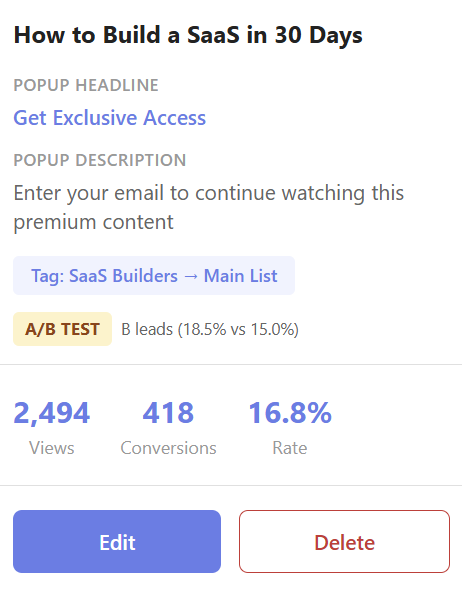
Pro users of emailplay.io can A/B test subject lines, button text, colors, descriptions, and more.
Video gating tools compared — from free to enterprise
The tool landscape for video email capture splits into two distinct categories: platforms that require you to re-host your videos on their servers, and tools that work with videos already on YouTube. This distinction matters more than any feature comparison because it determines whether you need to migrate your entire video library or not.
YouTube-native gating tools
These tools let you keep your videos on YouTube while adding an email gate when they're embedded on your website. There's no re-uploading, no storage fees, and no duplicate video libraries to manage.
EmailPlay is purpose-built for gating YouTube videos behind email opt-in forms. It integrates directly with Mailchimp, ConvertKit, or Zapier/Webhooks. It offers pre-roll, mid-roll, and post-roll gate placement, supports popup-style video gates, and includes A/B testing on higher tiers. Pricing starts at $10/month.
ConvertPlayer is a WordPress plugin that overlays email forms on YouTube and Vimeo embeds. It's lightweight and affordable at around $8/month, but it's limited to WordPress sites and has fewer customization options. [Update: ConvertPlayer has now been shut down]
Proprietary hosting platforms with email capture
These platforms host videos on their own servers and include email gating as one feature among many. They offer more control over the video player experience but require migrating content off of YouTube.
Wistia is the market leader for video marketing, and their Turnstile feature is the most well-known video email gate. It's polished, well-integrated with enterprise tools like HubSpot and Marketo, and backed by strong analytics. The catch: Turnstile requires the Pro plan at $79/month (billed annually) and advanced integrations push the price to $319/month. Every video file must be hosted on Wistia's servers — YouTube videos aren't supported.
Vidyard focuses on video for sales teams, with features like personalized video messages and CRM integration. Email capture is available but positioned as a sales tool rather than a content creator tool. Pricing starts around $59/month for features that include lead capture. Like Wistia, it requires proprietary hosting.
Spotlightr targets course creators and offers email capture gates with an interesting hybrid approach. You can import YouTube videos into their system, though they're re-hosted rather than played natively from YouTube. Starting at $15/month, it's more affordable than Wistia or Vidyard.
SproutVideo offers lead capture forms on their hosted videos starting at around $10/month. It's a solid option for privacy-focused use cases but has less brand recognition and a smaller integration ecosystem.
Vimeo includes basic contact form functionality on their paid plans (starting at $25/month), but the forms are less sophisticated than dedicated gating tools.
The DIY approach
You can approximate video gating without any dedicated tool by uploading a YouTube video as "unlisted," creating a landing page with an email form, and redirecting subscribers to a hidden page containing the embedded video. This costs nothing but has significant drawbacks: tech-savvy viewers can find the hidden page URL, there's no mid-roll or post-roll gating, the experience feels clunky, and you lose analytics on gate performance. It's a reasonable proof-of-concept but not a sustainable strategy.
How to decide
If your videos already live on YouTube and you want to start capturing emails without migrating content, a YouTube-native tool is the practical choice. Today YouTube is the second most popular search engine. You want your content on YouTube!
If you're building an enterprise video marketing operation with CRM integration and detailed viewer analytics, Wistia or Vidyard may justify their higher price. For most content creators, the YouTube-native approach offers the best ratio of results to effort and cost.
Video gating strategies by audience type
The "right" way to use video gating depends on who you are and what you're trying to accomplish. Here's how the strategy maps to the four most common use cases.
For YouTubers (1K–50K subscribers)
Your biggest asset is a library of existing content that people already watch. Your biggest vulnerability is that YouTube owns the relationship with your audience — you have subscribers, not email addresses.
The strategy: identify your top-performing YouTube videos (sort by view count in YouTube Studio), embed them on your website or blog, and gate them behind an email form. You're not creating new content; you're adding a capture layer to content that's already proven to attract viewers on a new channel (Google organic search traffic rather than YouTube).
Start with a mid-roll gate at the 50% mark on your most-viewed tutorial or how-to video. Drive traffic to the embedded version (not the YouTube version) from your YouTube video descriptions, social media, and anywhere else you link to your content.
The psychological insight here is that viewers who come to your website to watch a video they could find on YouTube are already more committed than casual YouTube browsers. They clicked an extra link to get there. Gating at mid-roll converts these viewers at far higher rates than YouTube end screens do.
For course creators
You have a specific conversion goal: grow an email list large enough to make your next course launch profitable. At typical email campaign conversion rates are 1-2%, selling 100 seats at $500 requires between 5,000 and 10,000 email subscribers. Every subscriber matters.
The strategy: gate your "free preview" content. If you have a YouTube channel where you share lessons related to your course topic, those videos are already doing the work of demonstrating your teaching ability. Embed your best free lesson on your course sales page or a dedicated landing page, gate it behind an email form, and funnel those subscribers into a launch sequence.
The "free mini-course" variation is especially powerful: create 3-5 short videos covering a subset of your paid course material, gate each one behind email (or gate the first and deliver the rest via email automation), and use the sequence to nurture subscribers toward a purchase.
Course platforms like Teachable, Thinkific, Kajabi, and Podia all allow custom embeds on their sales pages. The gated video replaces the standard "watch a free preview" button with an email-gated experience that builds your list while it demonstrates your expertise.
For coaches and consultants
Your conversion path typically runs from "stranger" to "email subscriber" to "discovery call" to "client." Video gating accelerates the first transition by letting prospects experience your coaching style before they commit to a conversation.
The strategy: gate a high-value video that showcases your methodology. This could be a recorded coaching session (with the client's permission), a framework walkthrough, a case study breakdown, or a "day in the life" video that builds personal connection.
Place this gated video prominently on your homepage or services page. Coaches often underestimate how much prospects want to see them in action before booking a call. A gated video gives prospects a low-commitment way to evaluate you while giving you their email address so you can follow up through your email marketing.
The nurture sequence after the gate should be short and direct: one email delivering additional value, one email sharing a client result or testimonial, and one email with a clear call-to-action to book a discovery call.
For newsletter writers
Growing a newsletter subscriber list is a constant challenge, and most growth tactics (referral programs, cross-promotions, paid recommendations) are costly and eventually plateau. Video gating offers a growth channel that almost nobody in the newsletter space is using.
The strategy: create short, exclusive video content such as market analysis, a behind-the-scenes look at your research process, an interview with a source, and gate it on your newsletter landing page or website. The video serves as both a lead magnet and a preview of the quality subscribers can expect from your newsletter.
This works especially well if you normally communicate through text. Video feels more personal and builds a stronger connection with potential subscribers. A 3-minute video of you explaining why your newsletter exists and what makes it different, gated behind an email form, can outperform a standard "subscribe for free" landing page by a wide margin.
When NOT to gate your videos
Video gating is powerful, but it's not appropriate for every video or every situation. Using it in the wrong context will frustrate viewers, damage trust, and undermine the strategy's effectiveness where it actually works.
Don't gate brand awareness content. If the goal of a video is to introduce people to your brand or build top-of-funnel awareness, gating it defeats the purpose. You want maximum reach, not maximum capture. Let these videos play freely and use them to drive traffic to other content that is gated.
Don't gate everything. If every video on your website is gated, visitors will feel like they're being squeezed for data at every turn. The best approach is a mix: most content plays freely (building trust and demonstrating value), while select high-value pieces are gated (capturing emails from your most interested viewers).
Don't gate without delivering real value. The implicit promise of a video gate is "give me your email and I'll give you something worth watching." If the gated video is mediocre, the subscriber will feel tricked and they'll unsubscribe, mark your emails as spam, or simply never engage again. Only gate content you're genuinely proud of.
Don't ignore mobile. Over 60% of video viewing happens on mobile devices. If your gate doesn't render properly on a phone because of tiny form fields, overlapping elements, unresponsive buttons, you're losing the majority of potential subscribers. Always test the gated experience on mobile before going live.
Getting started: your first gated video in 30 minutes
You don't need a perfect strategy to begin. Start with one video, one gate, and one email integration. Here's the minimum viable version.
Pick your best-performing YouTube video. Embed it on a page of your website using a YouTube-native gating tool like EmailPlay. Set a mid-roll gate at the 50% mark. Connect it to your email platform, Mailchimp or ConvertKit for example. Set the form to collect email only (no name). Write a simple one-line headline and a few sentences for the lower text description.
Promote the page by adding a link in your YouTube video description: "Watch the extended version on my website" or "Get the full tutorial with bonus content at [your site]." Share it on social media. Add it to your email signature.
Then watch the data. If your first video gate converts above 10%, you have product-market fit for the strategy. Start gating more videos, testing different placements, and building the email sequences that turn subscribers into customers.
Video gating isn't complicated, it's just underused. There is a significant gap between what the data clearly shows works and what most creators actually do. The opportunity is there for anyone willing to try it.
We have a 7 day trial at EmailPlay, so what are you waiting for?